Best Free DMARC Monitoring Tools
The best free DMARC monitoring tools parse your aggregate report XML and show who's sending as your domain, without a credit card. Tiers differ on three things: monthly volume cap, days of history, and whether a business domain is even allowed. Here's how nine of them compare.


Free DMARC monitoring is a real starting point, not a trial
DMARC reports arrive as compressed XML attachments from every receiving mail server that touches your mail. Gmail alone sends one a day per sending source. Nobody reads that by hand.
That's the whole job of a DMARC report analyzer: turn the XML into a list of sending sources with pass and fail counts against each. Until you have that list, you can't safely move past p=none, because you don't yet know which of your own systems would break.
What stalls most small teams is the money. Entry-level self-serve plans run roughly $6 to $36 a month, and enterprise contracts start around $5,000 a year. That's a real line item to defend for something your finance lead has never heard of.
The deadline, though, belongs to somebody else. Google and Yahoo made a published DMARC record table stakes for bulk senders, and the current thresholds live in Google's email sender guidelines. So the question isn't whether to start. It's whether you wait for a purchase order first.
A free tier settles that. You get visibility this week and a real number for next quarter's budget request.
What a free DMARC monitoring tool actually does
A free DMARC monitoring service hands you a reporting address. You point the rua tag in your DNS record at it, and the reports go to their parser instead of your inbox.
_dmarc.example.com. IN TXT "v=DMARC1; p=none; rua=mailto:reports@your-monitoring-service.com; pct=100"
Two different things get blurred together in most roundups. A free DMARC checker reads the record you've already published and flags syntax problems on the spot, with no signup and no DNS change. Our free DMARC record checker does that in a few seconds. Ongoing monitoring is the other shape: an account, a DNS change, and a dashboard that fills up over weeks. Most people need both, at different moments.
DMARC aggregate report dashboard showing sending sources with pass and fail counts
Nearly every free tier drops failure reporting, the ruf stream carrying headers from individual failed messages. EasyDMARC's free plan reads aggregate reports but not forensic ones, so you can see that a source failed without seeing which message did it. For the discovery phase that's fine. Both report types are defined in RFC 7489, and we go through the fields in how to read DMARC aggregate reports.
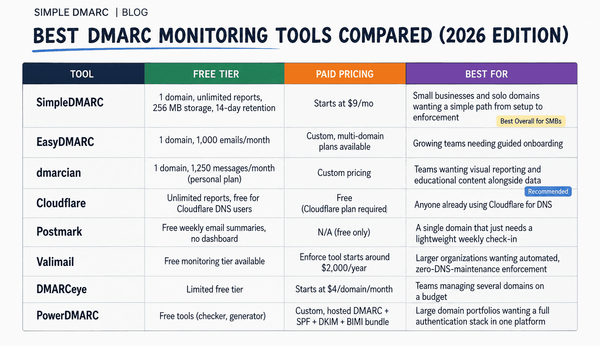
The best free DMARC monitoring tools compared
Limits below were checked against vendor pricing pages in September 2026. Verify before you commit, because these move more often than you'd think.
| Tool | Free tier volume | Domains | Retention | Commercial use? |
|---|---|---|---|---|
| SimpleDMARC Free | Unlimited | 1 | 14 | Yes |
| Cloudflare DMARC Management | Unlimited | Your Cloudflare zones | Limited window | Yes, needs Cloudflare DNS |
| DMARC Report (Core) | 10,000 reports/mo | 1 | 30 days | Yes |
| Valimail Monitor | Unlimited | 1 | Limited | Yes |
| EasyDMARC Free | 1,000 emails/mo | 1 | 14 days | No, personal only |
| dmarcian Personal | Not published | 1 | Limited | No, personal only |
| PowerDMARC Free | 1 domain | 1 | Limited | No, personal only |
| Postmark DMARC Digests | Unlimited | 1 | No dashboard | Yes |
| parsedmarc (self-hosted) | Unlimited | Unlimited | Your storage | Yes |
SimpleDMARC Free
Signup to first report with no sales call, and no personal-use clause, so a business domain is welcome on it. You get aggregate report parsing, sender identification across Microsoft 365, Google Workspace, SendGrid and Mailchimp, and a guided route from p=none to enforcement. Paid plans start at $9.99 a month when you outgrow it; the tiers are on the pricing page.
Cloudflare DMARC Management
Free with unlimited reports if your DNS already sits on Cloudflare. Setup is about two clicks, because Cloudflare already owns the zone. It's a reporting view rather than an enforcement workflow, which is exactly what you want on day one and not what you want on day ninety. Setup steps are in the Cloudflare DMARC Management docs.
DMARC Report (Core)
The free plan covers 10,000 monthly reports, one domain, 30 days of data history, and aggregate reports. That 30-day window is the most generous retention here, and it's the spec we'd weight highest. Thirty days means you can compare a full billing cycle against the one before it.
Valimail Monitor
Free with unlimited email volume, which suits anyone who's already blown through a capped tier. The free product is narrower than the paid enforcement platform, so if you like poking at per-source detail yourself, you'll find it thin.
EasyDMARC Free
$0 for one domain, 1,000 emails a month, 14 days of history, one invited user, aggregate reports only, and marked personal use only. Good for learning what a report looks like. Not a business tier, and the 14-day window is short enough that a two-week holiday erases your baseline.
dmarcian Personal
The Personal plan is restricted to non-business use and is subject to an acceptable-use audit, so a business domain on it will eventually expire with an invitation to subscribe. dmarcian's educational material is the best in the category and worth reading regardless. The free plan just isn't a commercial option.
Three more are worth knowing about. PowerDMARC's free plan is also personal and non-commercial, so treat it as evaluation only. Postmark DMARC Digests turns your reports into email summaries and is free whether or not you send through Postmark, with no dashboard at all, which is either the appeal or the dealbreaker. And parsedmarc with Elasticsearch is the open-source standard for self-hosted analysis: unlimited everything, plus a container stack that's now your problem to patch.
One option is gone. The UK NCSC retired Mail Check's DMARC reporting on 31 March 2026, so any roundup still recommending it is stale.
How to pick a free DMARC tool for your setup
The table narrows quickly once you apply your own constraints.
- Read the use clause before the feature list. Three of the nine tiers above bar business domains outright. A tier you'll be audited off in six weeks isn't free, it's a trial wearing a disguise.
- Count your real monthly send volume first. Free caps run from about 1,000 to 10,000 messages a month. A thousand covers a five-person firm sending nothing but transactional mail. Add a newsletter and you're over it inside a week.
- Weight retention higher than feels natural. Free tiers typically keep 7 to 30 days. Anything under a month and you can't answer "did this get worse after the migration?"
- If your DNS is on Cloudflare, start there. It costs two clicks, and you can layer a deeper analyzer on later by adding a second
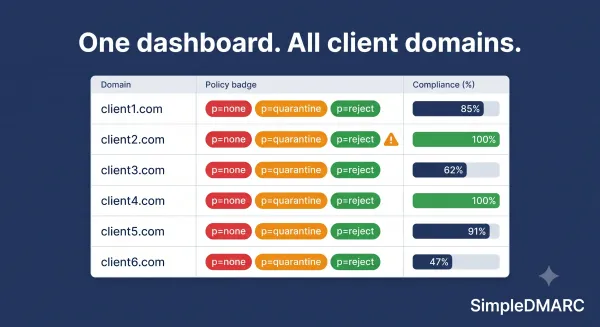
ruaaddress. - MSPs should skip free tiers entirely. Every plan here is single domain and single tenant, so eight clients means eight logins and no cross-client view. Per-domain MSP pricing exists for this, commonly around $7 per domain per month. Multi-tenancy is the real upgrade for service providers, not volume.
Common mistakes with a free DMARC monitoring tier
Publishing p=none and never opening the dashboard again is the failure we see most. The record generates reports. It doesn't block anything. Spoofing stops at p=quarantine or p=reject, and not one step earlier.
Quietly blowing past the cap is the sneakier one. Most services stop processing rather than shout, so your dashboard looks healthy while it's missing half your mail. That's worse than no dashboard, because you'll trust it. Put a volume check in the calendar for week four.
Running a business domain on a personal plan ends the way you'd expect. dmarcian's audit closes the account right around the time you've finally accumulated the history you needed.
Jumping to p=reject after one good week is the expensive mistake. A week misses your monthly invoicing run, the quarterly newsletter, and whatever mailing lists your staff are subscribed to. Sit at p=none for a full cycle, then ramp with pct=.
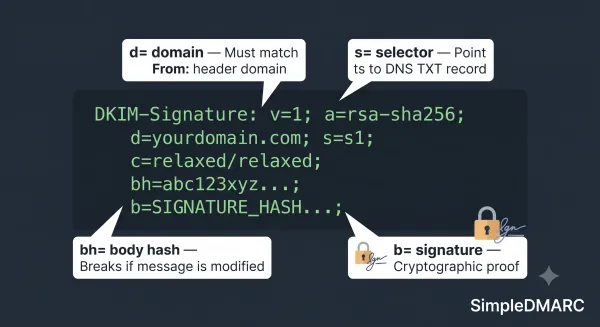
Last one: the reports tell you what failed, not how to fix it. The fix is almost always in your SPF record or your DKIM signing, over at the sending platform.
Frequently asked questions
What is the best free DMARC monitoring tool?
For a business domain that needs ongoing monitoring, SimpleDMARC's free tier and DMARC Report's Core plan are the strongest picks, because neither restricts commercial use and both parse aggregate reports into a dashboard. If your DNS is already on Cloudflare, Cloudflare DMARC Management is the fastest free start.
Is free DMARC monitoring good enough for a small business?
Often, yes. A free tier covers a single active domain in discovery, or a stable p=reject setup, as long as the retention window covers what you need to look back on. You outgrow it when you're managing three or more domains, need months of enforcement evidence for an auditor or insurer, or you're actively ramping policy.
Do free DMARC tools include forensic reports?
Rarely. Free tiers almost always cover aggregate (rua) reports only. Failure reports (ruf), which carry headers from individual messages, are a paid feature at nearly every vendor, partly because of the privacy handling they require.
Can MSPs use free DMARC monitoring for client domains?
Not practically. Free plans are single domain with no client separation, so ten clients means ten unrelated accounts and no consolidated view. Per-domain MSP pricing around $7 a domain exists precisely for this.
How long until a free DMARC tool shows data?
Usually 24 to 72 hours after your DNS change propagates. Reporting cadence is set by the receiving providers, and most send aggregate reports once a day. Expect a rough sender inventory within a week and a trustworthy one after a month.
Does a free DMARC tool stop email spoofing by itself?
No. Monitoring shows you what's happening. Your published policy decides what receivers do about it. Spoofed mail only gets rejected once your record reaches p=reject and your legitimate senders pass authentication.
Start monitoring, then decide what to pay for
Free DMARC monitoring is a legitimate end state for a single-domain business, not a waiting room. Two things disqualify a tier: a personal-use clause, and a retention window shorter than your billing cycle. Check both before you touch DNS. The rest you can judge from the dashboard within a week.
Start free with SimpleDMARC. There's no credit card and no sales call, and business domains are welcome on the free tier. Point your rua tag at us and you'll have a sender inventory inside a week. When you need multi-domain or MSP handling, the upgrade path is on the pricing page, and our full breakdown of the paid platforms is in best DMARC monitoring tools.