DMARC for Digital Agencies: Managing Client Domains
Digital agencies managing client DMARC face a problem most platforms ignore: you pay more when clients get attacked. Here's a smarter way to manage domain portfolios.

Managing DMARC for client domains is not the same problem as managing DMARC for your own domain. The reporting volume is different, the billing model matters differently, and the thing that breaks most often — parked domains belonging to clients who've forgotten about them — is something most DMARC platforms weren't built to handle cheaply.
This guide covers what digital agencies and MSPs actually need from a DMARC platform, where standard platforms fall short, and how SimpleDMARC's pricing model handles the specific economics of agency-scale domain management.
What Digital Agencies Actually Need from a DMARC Platform
The requirements shift when you're managing DMARC across 20, 50, or 200 client domains rather than one. A feature that's fine for a single organisation becomes a bottleneck at portfolio scale.
What matters for agencies:
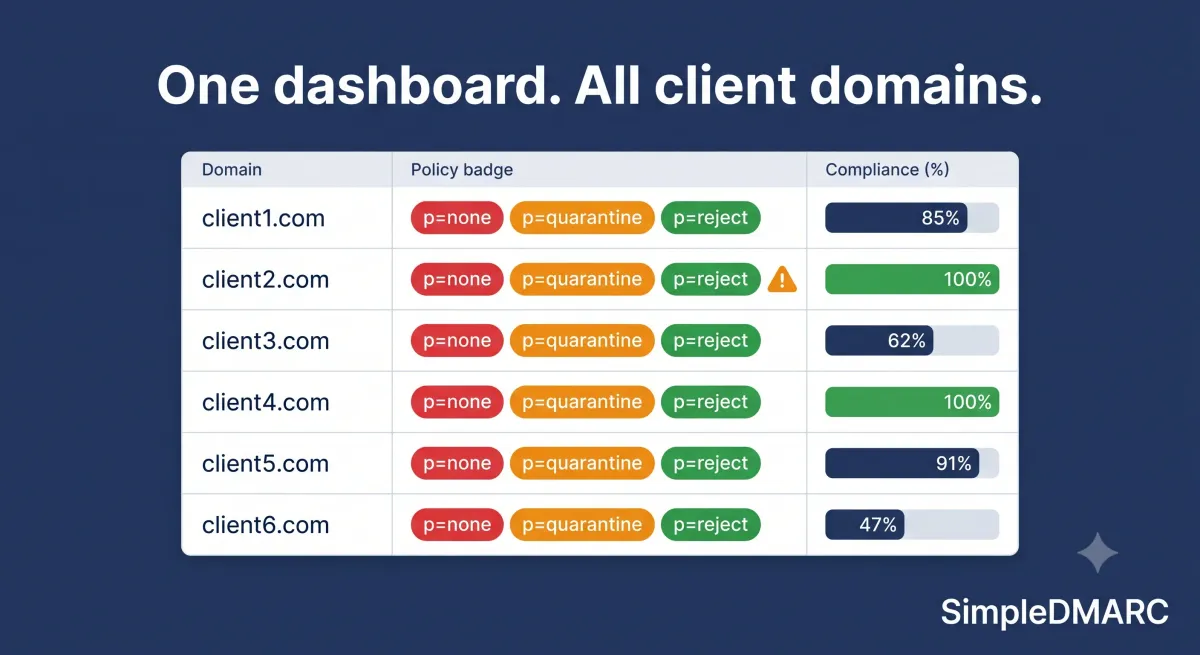
- Multi-tenant dashboard. A single login that shows all client domains, their current DMARC policy, compliance rates, and active alerts — without switching between separate accounts.
- Passive domain handling. Clients accumulate parked domains from acquisitions, old brand names, and regional variants. These domains need DMARC records to prevent spoofing, but they generate almost no legitimate email. The platform shouldn't charge for them the same way it charges for active sending domains.
- White-label reporting. Reports that carry your agency's branding, not the monitoring platform's.
- Per-client enforcement visibility. Where is each client in the p=none → p=quarantine → p=reject progression? Which clients have failing third-party senders that haven't been fixed?
- Billing that doesn't punish you for attack traffic. This is the one most agencies don't think about until it's too late.
The Billing Problem Nobody Talks About
Google and Yahoo's 2026 bulk sender requirements have made DMARC essential, not optional for agencies managing client email infrastructure. That's fine. The problem is how most DMARC platforms charge for this.
Most platforms price by email volume: the number of messages they process on your clients' behalf. This feels reasonable — more email means more processing.
But here's the catch. When an attacker spoofs a client's domain — sending phishing emails that claim to come from that client — DMARC aggregate reports for that domain fill up with those attempts. On a volume-based platform, that attack traffic counts against your plan.
If a client runs an e-commerce domain and a phishing campaign targets their customers using that domain, you see a spike in report volume. Your costs go up. You are paying more precisely because your client is being attacked.
SimpleDMARC uses storage-based pricing instead. You pay based on the compressed report data you retain, not the number of emails that triggered those reports. Attack traffic generates more report data, but compressed DMARC XML is small — a sustained phishing campaign against a client's domain produces a bounded storage impact, not a linear cost increase with the attack volume.
For agencies managing clients who receive spoofing traffic, the billing model is worth examining before you choose a platform. See SimpleDMARC's agency and MSP pricing for how storage tiers work at portfolio scale.
Handling Parked Domains at Agency Scale
Every agency has the same problem: clients own more domains than they actively use.
A retail client acquired a competitor three years ago and kept the old domain. A software company registered regional variants (.co.uk, .com.au, .de) but only actively sends from the .com. A consultancy has a legacy domain from before a rebrand that still gets probed by bots.
Each of these parked domains needs a DMARC record. Without one, attackers can send email that appears to come from that domain, and your client's customers have no technical protection against it.
But managing parked domains through a volume-based platform means paying for domains that generate almost no legitimate traffic. You're protecting them at full price because the billing model doesn't distinguish between a domain sending 50,000 emails a month and a domain sending zero.
On SimpleDMARC, passive domains — those not generating meaningful email traffic — don't consume meaningful storage allocation. If you're managing 50 client domains and 20 are parked, your cost reflects 30 active domains, not 50 at the same rate.
The correct DMARC record for a parked domain that genuinely never sends email is immediate p=reject with a reporting address:
v=DMARC1; p=reject; rua=mailto:dmarc@simpledmarc.com;
There's no gradual rollout needed for domains that don't send. You can move straight to full enforcement because there's no legitimate email to protect.
The Multi-Tenant Dashboard Question
Before selecting a platform, test the specific multi-tenant workflow:
Can you see all client domains at a glance? A portfolio view showing each domain's current policy, compliance rate, and any active alerts — without needing to click into individual client accounts — is the baseline requirement. Switching between separate logins per client kills time at scale.
Can you see which clients are stuck at p=none? Even among domains with DMARC records, more than half a million remain at p=none, the monitoring-only policy that offers zero protection. For agency-managed portfolios, the operational question is: which clients haven't moved to enforcement yet, and why? The platform should surface this without manual checking.
Can you see new unauthorized sending sources? When a client adds a new email tool without telling IT — a new CRM, a helpdesk system, a marketing platform — it shows up in DMARC reports as an unknown source. The platform needs to alert on new sources, not just report them passively.
Are reports white-labelable? If you're presenting DMARC reports to clients as part of a managed service, your branding should appear on those reports, not the monitoring tool's.
Run your first client domain through the free DMARC checker at simpledmarc.com to see report parsing and sender identification in action before committing to a platform.
Client Onboarding: The Standard Workflow
When you bring a new client's domain into your DMARC program, the workflow is the same whether you manage one client or a hundred. The variable is how long each step takes, which is where platform tooling matters.
Step 1: Audit the domain's current state. Check for an existing DMARC record, SPF record, and DKIM configuration. Many clients will have incomplete setups — an SPF record that's missing third-party senders, or a DMARC record without a reporting address. The free DMARC checker handles this in seconds per domain.
Step 2: Publish or update the DMARC record at p=none. If the client has no DMARC record, publish one immediately:
v=DMARC1; p=none; rua=mailto:reports@simpledmarc.com; fo=1;
The rua= address should route to SimpleDMARC so reports are parsed automatically. If the client already has a record with a different reporting address, add SimpleDMARC's address alongside the existing one — DMARC allows multiple rua= addresses separated by commas.
Step 3: Monitor for 2-4 weeks. Review the aggregate reports in your dashboard. Identify every source sending email as the client's domain, categorise each as authorised/failing/unknown, and assign remediation for failing sources.
Step 4: Fix authentication for all legitimate senders. Third-party senders — CRMs, helpdesks, marketing platforms — need SPF and DKIM configuration before enforcement. This step takes the most time, particularly for clients with many senders. For the full enforcement progression, see the p=none to p=reject guide.
Step 5: Move to enforcement. Once legitimate senders are all passing authentication, move to p=quarantine at 10% using the pct= tag, monitor for false positives, then escalate to p=quarantine pct=100, and finally p=reject.
Why Agency Clients Resist DMARC Enforcement
Understanding the resistance helps you handle it. Three objections come up repeatedly:
"We're not sure what email systems we have." Common for clients who've grown via acquisition or have decentralised marketing. The answer is: that's exactly why you need to be at p=none monitoring first. You'll find out what's sending email in the reports. Don't set a policy until you know.
"We're afraid of blocking legitimate email." This is the right concern, and the gradual enforcement approach with pct= exists specifically to address it. You can go from pct=10 to pct=25 to pct=50 to pct=100 at quarantine, watching for issues, before any email is permanently rejected.
"We send email from a lot of different tools." This is an authentication problem, not a DMARC problem. Each tool needs to be configured for SPF or DKIM alignment before DMARC can be enforced. The monitoring phase surfaces exactly which tools need fixing.
DMARC as an Agency Service Line
Many MSPs find that offering DMARC as a managed service presents a significant revenue opportunity due to the high demand and low client capability in this area. Most businesses know they need email authentication; few have the internal knowledge to implement it properly.
The service model for agencies typically involves an initial audit and setup fee, followed by monthly monitoring and reporting. The monitoring work is largely automated once the platform is configured — the ongoing labour is client communication and responding to alerts when new unauthorized senders appear.
The economics work well when:
- Your platform doesn't charge more when clients are under attack
- Parked domains in your portfolio don't consume the same allocation as active sending domains
- Reports are white-labeled so the service is branded as yours
Clients often add new email tools and third-party platforms — marketing software, helpdesk systems, invoicing tools, or CRMs, and every new platform needs to be added correctly to the client's DMARC setup. This ongoing configuration work is where agencies provide genuine value: catching authentication gaps before they become enforcement failures.
FAQ
How many client domains can SimpleDMARC manage?
SimpleDMARC supports multiple domains on paid plans. The storage-based pricing model means adding domains scales cost with the report data they generate, not at a flat per-domain rate. Active sending domains generate more report data and cost more to store; passive parked domains generate less and cost proportionally less.
What's the difference between an MSP and a digital agency in terms of DMARC management needs?
The technical requirements are identical: multi-tenant dashboard, passive domain handling, white-label reporting, and enforcement lifecycle tracking. The audience difference is mainly in what clients they serve. MSPs tend to manage IT infrastructure broadly; digital agencies focus on brand, marketing, and web. Both need the same DMARC platform capabilities.
Do I need to set up DMARC for parked client domains?
Yes. Parked domains are actively exploited. Attackers probe domains with no sending history specifically because owners assume nothing needs protecting. Publish p=reject on all parked domains immediately — there's no gradual rollout needed when there's no legitimate email to protect.
Can I add SimpleDMARC's reporting address alongside my client's existing monitoring tool?
Yes. Add SimpleDMARC's rua= address alongside any existing address in the client's DMARC record. Both platforms receive reports simultaneously, which is useful for evaluation or transition periods.
How does SimpleDMARC handle attack traffic in billing?
Attack traffic generates DMARC aggregate reports, but SimpleDMARC's pricing is based on stored report data, not email count. A spoofing campaign against a client's domain increases report volume temporarily, but the compressed XML storage impact is far smaller than the email count impact on a volume-based platform. Your costs don't spike because a client is being attacked.
What Google's bulk sender requirements mean for agency clients in 2026?
Any client sending more than 5,000 emails per day to Gmail addresses must have a DMARC record published. Microsoft enforces similar requirements for Outlook.com. If your agency manages email marketing for clients at that volume, their domains need DMARC before their campaigns hit deliverability problems.
Managing DMARC for client domains is a service most agencies will need to offer in 2026, whether they position it explicitly or handle it quietly as part of email setup. The platform you use determines how much that service costs you — both in time and in billing when clients' domains come under attack.
Start with a free DMARC audit on your first client domain. The report parsing, sender identification, and policy status are all visible without creating an account.