Phishing vs. Spear Phishing: What’s the Difference?
Phishing and spear phishing are both fraudulent email attacks, but they differ in one word: precision. Phishing casts a wide net — generic messages sent to thousands of people.

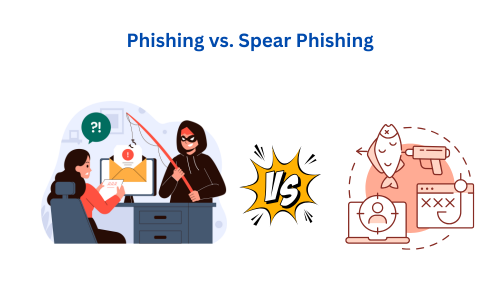
Spear phishing is aimed at one person, using their name, role, and relationships to look convincing. That targeting is what makes spear phishing harder to spot and far more costly.
Below is the difference at a glance, followed by how each attack works, real examples, and the practical steps that stop both.
Updated: August 2026
Phishing vs. spear phishing: the key differences at a glance
If you only remember one thing, make it this table. It covers the difference between phishing vs. spear phishing in the terms that actually matter to a business.
| Aspect | Phishing | Spear phishing |
|---|---|---|
| Target | A broad audience — anyone the attacker can reach | A specific person or small group |
| Volume | Thousands to millions of emails | A handful, sometimes just one |
| Personalization | Generic ("Dear customer") | Uses your name, job title, and known contacts |
| Attacker effort | Low — copy a template, hit send | High — hours of research on the target first |
| Typical goal | Steal login credentials or spread malware at scale | Authorize a wire transfer, hand over sensitive data, or breach a specific company |
| Common form | Fake "your account is locked" emails | CEO fraud, fake vendor invoices, Business Email Compromise (BEC) |
| Why it's dangerous | Volume — a small success rate still catches many | Believability — it looks like a real message from someone you trust |
The rest of this guide unpacks each side of that table so you can recognize both in your inbox.
What is phishing?
Phishing is a fraudulent attempt to steal sensitive information — passwords, card numbers, personal data — by impersonating a trustworthy organization. The attacker sends the same message to a large list and plays the odds: even a 1% success rate across a million emails is 10,000 victims.
A phishing email usually pushes you to click a link or open an attachment. The link leads to a fake login page built to capture your credentials; the attachment carries malware. To make the message land, attackers impersonate names you already trust — your bank, a delivery company, Microsoft, or your own IT department.
Phishing isn't limited to email. The same tactic shows up across channels:
- Email phishing — the most common form. Fake messages with links to credential-harvesting pages.
- Vishing (voice phishing) — phone calls from someone posing as your bank or a support desk.
- Smishing (SMS phishing) — urgent text messages with malicious links.
- Clone phishing — a copy of a real email you've received before, with the links swapped for malicious ones.
Phishing stays effective because it's cheap to run and only needs a few people to slip up. Verizon's 2025 Data Breach Investigations Report found phishing was the third most common way breaches began — involved in 16% of them — and that roughly 60% of all breaches involved a human element, such as someone clicking a malicious link.
What is spear phishing?
Spear phishing is a targeted form of phishing aimed at a specific individual or organization. Instead of a generic blast, the attacker researches the target first — often pulling details from LinkedIn, the company website, and social media — then writes a message that fits that person's world. It reads like a normal request from a colleague, executive, or supplier.
That research is the whole difference in spear phishing vs. phishing. A phishing email hopes you don't look closely. A spear phishing email is built so that looking closely doesn't help — the sender name, the tone, and the context all check out.
A few common variants:
- Whaling — spear phishing that targets senior executives (CEO, CFO), who can approve payments or access the most sensitive data.
- CEO fraud — the attacker impersonates a leader and sends an urgent, believable instruction, usually "pay this now" or "send me these files."
- Business Email Compromise (BEC) — the umbrella category where a trusted email identity is impersonated (or a real account is hijacked) to commit fraud. BEC is consistently among the costliest cybercrimes for businesses.
Because spear phishing relies on trust rather than volume, a single successful message can do more damage than an entire phishing campaign.
Real-world examples of phishing and spear phishing
Examples make the difference concrete.
Phishing: In one large 2020 campaign, attackers sent millions of emails disguised as Microsoft Office 365 alerts. Recipients were funneled to a fake login page that captured their credentials — a textbook wide-net attack that worked through sheer scale.
Spear phishing: Between 2013 and 2015, one operator ran a spear phishing scheme against Facebook and Google, posing as Quanta Computer — a hardware supplier both companies actually used — and sending forged invoices to the right employees. The two companies wired out more than $100 million before the fraud was caught, according to the U.S. Department of Justice.
The scale gap is the point. Business Email Compromise — the category that a spear phishing attack usually falls under — is one of the costliest cybercrimes for businesses. The FBI's Internet Crime Complaint Center (IC3) logged $2.77 billion in reported BEC losses in 2024 alone — its second-highest category by losses — and nearly $8.5 billion across 2022 to 2024. You can review the current numbers in the FBI IC3 annual reports.
How to spot phishing and spear phishing emails
Detection habits catch most attacks from both categories. Train yourself and your team to slow down on these signals:
- Check the real sender address, not the display name. Attackers spoof a familiar name while the underlying address is off by a character (
support@goog1e.com) or from a free mailbox. When in doubt, inspect the message headers — a free email header analyzer shows the true source. - Treat urgency as a warning, not a command. "Your account will be locked in 24 hours" and "wire this before end of day" are pressure tactics designed to stop you thinking.
- Verify unusual requests through a second channel. If your CEO emails asking for gift cards or a wire, call or message them directly. This one habit defeats most CEO fraud.
- Hover before you click. The visible link text and the real destination are often different. Hover to see where it actually goes.
- Be cautious with personalized asks. Spear phishing uses real details about you. A message knowing your name and role isn't proof it's genuine.
For everyday protection, the fundamentals still do the heavy lifting: turn on multi-factor authentication (MFA) so a stolen password isn't enough, keep software patched, limit what you share publicly, and run regular security-awareness training so employees recognize these patterns.
How DMARC helps stop email impersonation
Awareness catches a lot, but you can also make it technically harder for attackers to impersonate your domain — the case where a customer or employee gets an email that appears to come from your exact company address.
That's what DMARC does. It directly targets email spoofing of your own domain. DMARC (with SPF and DKIM) tells receiving mail servers to reject or quarantine messages that claim to be from your domain but aren't authorized. When enforced, it stops attackers from sending "you@yourcompany.com" phishing and BEC emails to your staff, customers, and partners. You can check your current setup in seconds with the free DMARC checker.
Be clear on the boundary, though: DMARC protects your exact domain. It doesn't stop lookalike domains (yourcompany-support.com), display-name spoofing from a stranger's mailbox, or a compromised account elsewhere. So the right defense is layered — DMARC to lock down your domain, plus the detection habits and training above for everything DMARC can't see. Used together, they close the biggest gaps that both phishing and spear phishing exploit.
Frequently asked questions
Is spear phishing worse than phishing?
For a business, usually yes. Phishing is higher volume but lower success per message. Spear phishing is far more convincing because it's personalized, so a single message can lead to a large wire transfer or data breach. The impact per successful attack is much higher.
What is the main difference between phishing and spear phishing?
Targeting. Phishing sends generic messages to a broad audience and plays the odds. Spear phishing is aimed at a specific person and uses researched personal details — their name, role, and contacts — to look legitimate.
Is Business Email Compromise (BEC) the same as spear phishing?
BEC is a type of spear phishing. It specifically involves impersonating a trusted business identity — an executive, employee, or vendor — to trick someone into sending money or sensitive information. It's consistently one of the most financially damaging forms of spear phishing.
Can DMARC stop spear phishing?
DMARC stops attackers from spoofing your exact domain, which blocks a major spear phishing and BEC vector. It does not stop lookalike domains or display-name tricks, so pair DMARC enforcement with employee training and MFA for full coverage.
How do I know if an email is a spear phishing attempt?
Watch for an unusual or urgent request that involves money or sensitive data, especially one that appears to come from a senior person. Verify the real sender address, and confirm the request through a separate channel like a phone call before acting.
The bottom line
Phishing and spear phishing share a goal — tricking you into handing over money, credentials, or data — but they work at opposite ends of the same spectrum. Phishing is broad and generic; spear phishing is narrow, researched, and far more convincing. Knowing which you're looking at helps you respond correctly: skepticism for the mass-market bait, and strict verification for the personalized, high-stakes ask.
The strongest defense combines human awareness with domain-level protection. Start by locking down your own domain so attackers can't send email as you. Check where your domain stands right now with the free DMARC checker, then set up free DMARC monitoring at simpledmarc.com — no credit card, and you'll see who's sending mail as your domain within minutes.